Every few months someone asks whether Shopify SEO "works" without any apps - and the honest answer is: it depends on what you're trying to do and how big your catalog is.
Shopify's native SEO tools are genuinely good for a starting point. They cover the basics reliably and they're built into a platform that handles a lot of technical infrastructure for you. But there's a clear line between what Shopify gives you and what a growing store actually needs - and most store owners only discover where that line is after they've outgrown it.
This guide draws that line clearly, so you know what you're getting, what you're not, and what's actually worth paying for.
What Shopify Actually Gives You Out of the Box for SEO
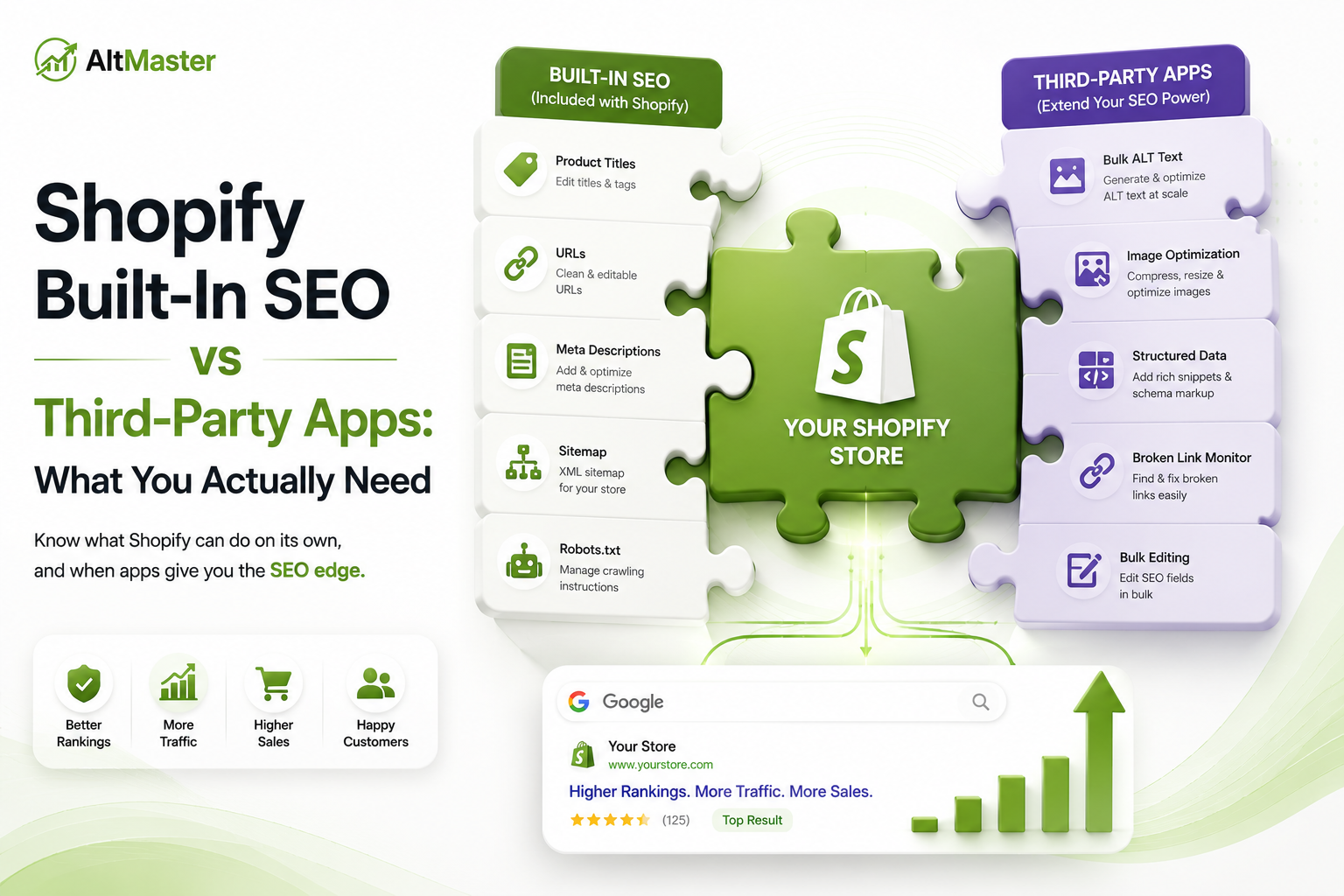
Shopify's native SEO foundation is stronger than most people give it credit for. Out of the box, every Shopify store gets:
Automatic sitemap generation at yourstore.com/sitemap.xml - updated automatically as you add products, collections, and pages. Submit it once to Google Search Console, and Google stays current with your catalog structure without any ongoing work from you.
SSL certificate included on every plan. HTTPS is a confirmed Google ranking signal and a baseline trust requirement for customers. Shopify handles it automatically - you never think about it.
Canonical tags on product URLs to handle the duplicate content issue that comes from products appearing in multiple collections. Shopify adds these automatically, which prevents most of the collection-path duplication problem without any app or code.
Editable title tags and meta descriptions on every product, collection, and page - directly from your admin without touching code. Clean, accessible, no developer required.
Fast, CDN-delivered image hosting with automatic WebP conversion for supported browsers. You upload a JPEG, Shopify serves WebP to modern browsers and JPEG as a fallback. The infrastructure behind this is enterprise-grade and included on every plan.
Clean URL structure with predictable path patterns: /products/, /collections/, /pages/. Not perfectly flexible, but readable by both Google and humans.
As Charle Agency - which has built and audited 100+ Shopify Plus stores - puts it: Shopify's native SEO settings give you a sitemap, clean URLs, and basic meta editing. That is the starting line, not the finish.
Where Shopify's Native SEO Tools Hit a Wall
What You Can't Do Without a Third-Party App
The gaps in Shopify's native SEO aren't bugs - they're deliberate scope limitations. Shopify is a commerce platform, not an SEO platform. The features it builds natively are the ones every store needs. The rest it leaves to the app ecosystem.
Here's what you genuinely can't do without an app or custom code:
Bulk metadata editing. Want to update title tags or meta descriptions across 200 products at once? Not natively possible. Shopify requires you to open each page individually. At scale, this isn't just slow - it's a practical barrier to keeping metadata current as your catalog evolves.
Schema markup beyond the basics. Shopify includes basic product schema, but to compete in 2026 you need JSON-LD schema at catalog scale and structured product data that ChatGPT and Perplexity can cite when generating shopping recommendations - none of that ships natively.
Redirect management at scale. Shopify's built-in redirect tool works fine for manual entries, but there's no bulk import or automated detection of broken links. A store that restructures collections or discontinues products regularly will accumulate 404 errors faster than the native tool can handle them.
Bulk ALT text generation. This is Shopify's most significant native SEO gap - covered in detail below.
URL structure control. Shopify forcibly adds /collections/ and /products/ to URLs and you cannot remove or edit this - something no app can fully fix. For most stores this doesn't materially affect rankings, but for stores migrating from platforms with cleaner URL structures, it's a constraint worth knowing upfront.
The Features Most Shopify Stores Outgrow Fast
Some limitations don't matter at 20 products and become real problems at 200:
Thin blog functionality. Shopify's built-in blog is basic. You can't categorize posts in a standard way, there's no native related-posts logic, and comment management is limited. For stores building content-led SEO strategies, this creates friction that compounds over time.
No native product review display. Reviews are a trust signal and a user-generated content source that contributes to long-tail keyword coverage. Shopify doesn't include review display natively - you need an app for it.
Limited crawl visibility. Shopify doesn't expose crawl budget data or log files natively. For large catalogs where crawl efficiency matters, you're working from Google Search Console's coverage report without deeper diagnostics that server-level access would provide.
The Third-Party Apps Worth Actually Paying For
Apps That Fill Real Gaps vs. Apps That Duplicate Native Features
The Shopify App Store has hundreds of SEO apps. Most fall into one of three categories:
Apps that fill genuine gaps - functionality Shopify simply doesn't offer natively. Bulk metadata editing, advanced schema markup, comprehensive redirect management, image ALT text at scale. These are worth evaluating based on the severity of the gap for your specific store.
Apps that duplicate native features with a marginally better interface. These are the ones to be skeptical of. If Shopify already generates a sitemap automatically, you don't need an app to generate one. If your theme already outputs basic product schema, installing a second schema app creates conflicts. The AltMaster guide to the best Shopify SEO apps for 2026 separates the apps that fill real gaps from those that just add script weight - worth reading before you commit to any paid tool.
Apps that claim SEO benefits but primarily serve other functions - social proof apps, upsell tools, page builders. These may help conversions, which indirectly helps SEO through engagement signals, but they're not SEO tools and shouldn't be evaluated as such.
How to Evaluate an App Before You Install It
Every app you install runs JavaScript on your storefront. Unused apps often leave scripts loaded on every page, which slows load times - and Google's Core Web Vitals scores directly affect SEO rankings, which means a poorly chosen SEO app can actively hurt your SEO while claiming to help it.
Before installing any SEO app, check three things: does it overlap with something Shopify already does natively (if yes, you probably don't need it); does it have recent reviews from stores at a similar size and catalog complexity (App Store ratings from 2022 are not relevant to 2026 Shopify); and does it add meaningful script weight to your storefront (check its impact on your PageSpeed score immediately after installing, not months later).
Avoid activating multiple tools with overlapping features - they often conflict by trying to override the same settings. One robust app that handles several SEO functions beats four narrow apps that partially do the same things.
The Image SEO Gap: Where Shopify Falls Shortest
Why Bulk ALT Text Is the #1 Missing Native Feature
Of all the gaps in Shopify's native SEO tooling, this is the one that costs the most stores the most traffic - and the least discussed.
Shopify allows ALT text to be added to images, but only one image at a time, through the admin UI, with no bulk editing, no detection of missing ALT text across the catalog, and no template system for consistent descriptions at scale. For a store with 50 products and 4 images each, that's 200 individual edits. For a store with 300 products, it's 1,200. The native tool simply doesn't scale.
The consequence is predictable: most Shopify stores launch with blank ALT text on the majority of their images and never fully catch up. New products go live every week without ALT text. Variant images are rarely properly labeled. Collection page thumbnails are untouched. Why Shopify product images become invisible to Google - even when store owners believe the problem is handled - is one of the most consistently overlooked indexing issues across Shopify catalogs of every size.
This is the exact gap AltMaster was built to close. It does what Shopify's native tools don't: scans your full catalog for missing or blank ALT text across every product, variant, and collection page, and generates descriptions in bulk using template variables - product title, variant color, material, product type - so every image gets a specific, human-sounding description in minutes. Variant images get their own descriptions, not copy-pasted from the hero shot. New products are covered automatically as they're added. For stores comparing which ALT text app fits their catalog size and workflow, the AltMaster breakdown of the best Shopify ALT text apps for 2026 covers the full field with honest assessments before you make a decision.
The Lean App Stack Every Shopify Store Actually Needs
The right number of SEO apps isn't "as many as possible" - it's the minimum required to cover the gaps Shopify's native tools don't. For most stores, that means three to four apps total:
Google Search Console (free, not an app but essential) - the closest thing to a direct line into how Google sees your store. Keyword tracking, indexing errors, Core Web Vitals data. Set it up before you install anything else. The guide to setting up a recurring monthly Shopify SEO maintenance routine shows exactly how to use it as part of a four-week workflow that keeps your store clean without SEO becoming a recurring project.
A schema and bulk metadata app - for stores that need JSON-LD schema beyond Shopify's native output and the ability to edit title tags and meta descriptions across the catalog without opening every page individually. One app, not two.
An image compression workflow - if you're regularly uploading large product images, compressing them to under 200KB before they hit Shopify. TinyPNG handles this free and without installation if you compress before uploading, which is the simplest approach for most stores.
AltMaster - for bulk ALT text generation and automatic coverage of new products. The only realistic way to keep image metadata clean at scale without it becoming a recurring manual project.
That's the stack. Everything else is situational - review apps, redirect managers, speed optimization tools - worth evaluating based on your specific store's gaps rather than installing preemptively.
Conclusion
Shopify's native SEO is a genuinely solid foundation - better than most platforms at the infrastructure level. The gaps are real but specific: bulk metadata editing, advanced schema, and above all, ALT text at scale. Knowing which gaps you actually have, based on your catalog size and growth trajectory, is what tells you which apps are worth paying for and which are just adding script weight to your storefront.
Start with what Shopify gives you. Add apps only where the native tool genuinely stops working for your store's needs. And treat every installed app as a PageSpeed cost until proven otherwise.
FAQs
Does Shopify SEO work without any third-party apps?
Yes - for smaller stores with manageable catalogs. Shopify's native tools cover the technical foundation reliably: sitemap, SSL, canonical tags, CDN delivery, editable metadata. Where they hit their limits is at scale - bulk editing, advanced schema, and ALT text management across hundreds of products. A store with 20 products can operate effectively without any SEO apps. A store with 200 products will hit those limits quickly.
How many SEO apps does a Shopify store actually need?
Three to four, maximum - and only where each one fills a genuine gap that Shopify doesn't cover natively. More than four and you're almost certainly duplicating functionality or adding unnecessary script weight. The lean stack: Search Console (free), one schema and bulk metadata app, an image optimization workflow, and AltMaster for ALT text. Beyond that, evaluate based on specific gaps rather than installing broadly.
Is paying for a third-party SEO app worth it for a small Shopify store?
It depends entirely on which gap you're filling. For a store under 50 products, most paid SEO apps aren't necessary - the native tools are sufficient, and the manual workarounds are manageable. The clearest exception is image ALT text: even small stores with multiple images per product accumulate hundreds of missing ALT text fields fast, and AltMaster's bulk ALT text generation for Shopify pays for itself quickly in the time it saves - especially as the catalog grows.