If you've spent any time managing a Shopify store, you already know that product images are doing a lot of heavy lifting. They're your first impression, your sales pitch, and your brand - all rolled into one. But here's what most store owners miss: the size of those images is just as important as how good they look.
After working with dozens of ecommerce stores, I can tell you that image sizing issues are consistently one of the most overlooked performance problems. This guide covers everything you need to get it right in 2026.
Why Getting Your Image Sizes Right Is Non-Negotiable
Let's be direct - wrong image sizes cost you customers. A slow-loading page, a blurry product photo, or an image that's cropped awkwardly on mobile will push a potential buyer straight to your competitor.
With over 4.4 million stores competing for attention in 2026, meeting platform image requirements is not optional - it's the baseline for how your products are perceived.
Beyond first impressions, there are three core reasons image sizing matters:
- Page speed: Large, unoptimized image files are the number one cause of slow Shopify stores. Every extra second of load time reduces your conversion rate. Compress images to under 500 KB each for optimal load times. You can check where you stand using Google's PageSpeed Insights.
- Search rankings: Google factors page speed and user experience into its algorithm. Properly sized images contribute directly to better rankings on search engine result pages.
- Professional appearance: Keeping image dimensions consistent across your store prevents awkward cropping, blurry thumbnails, and unexpected layout shifts - resulting in a cleaner, more professional shopping experience.
Responsive Images: One Size That Works Across Mobile, Tablet & Desktop
Here's something worth understanding before you upload a single image: your customers are coming from all kinds of devices. A background image that looks stunning on a widescreen desktop can become a cropped, distorted mess on a phone.
Data shows that more people now browse the internet on mobile devices than on desktop computers. With a variety of screen sizes in use, you need to choose the best image sizes so that all your visitors have a good user experience - no matter their device.
The good news? Shopify handles a lot of the heavy lifting. Shopify automatically generates responsive image sizes and serves WebP to supported browsers. But that doesn't mean you should upload anything carelessly.
A few principles to follow:
- Keep aspect ratios consistent across similar image types. For product images, stick to 1:1 (square) - it works cleanly across every Shopify theme.
- Upload at higher resolutions than what will be displayed. This gives Shopify room to scale down without quality loss.
- Square and vertical images adapt far better to narrow mobile screens than wide horizontal ones.
- For zoom functionality to work correctly on desktop, product images must be at least 800 × 800 pixels.
Choosing the Right Dimensions for Every Type of Content Image
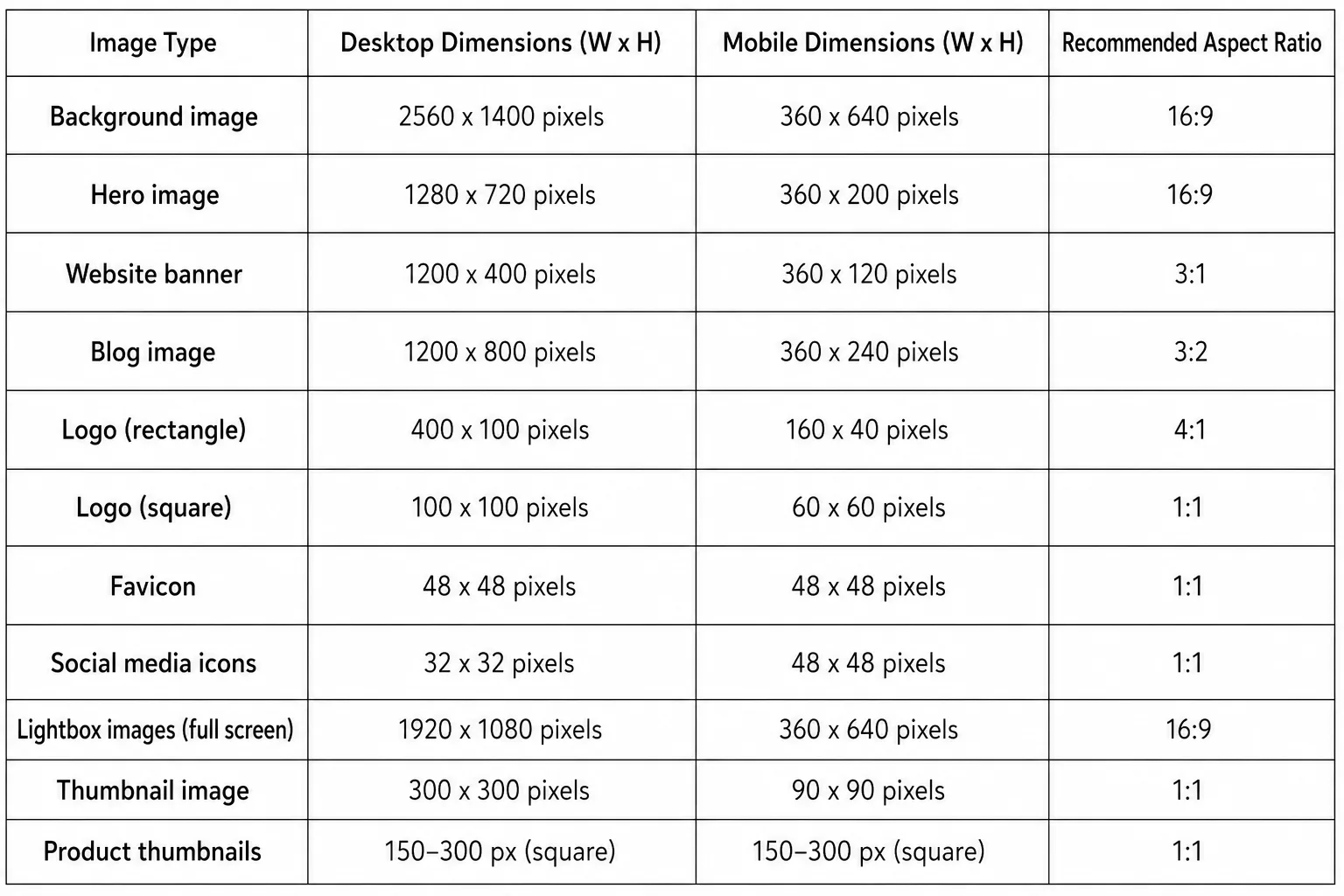
Not every image on your store serves the same purpose, which means there's no single "correct" size. There is no single best image size for Shopify because different sections use different layouts and aspect ratios - the correct size depends on where the image appears.
As a general starting point:
- Product images 2048 × 2048 px (1:1)
- Hero and banner images 1920 × 1080 px (16:9)
- Collection images 1024 × 1024 px (1:1)
- Maximum allowed 5000 × 5000 px, 20 MB
Consistency within each image category is more important than using the largest possible dimensions. Upload uniform sizes, and your store will look intentional and trustworthy.
Website Image Size Guidelines
Background Image Sizes
Background images are the largest visuals on your store. They set the tone for your brand before a visitor reads a single word.
- Recommended size 2560 × 1400 px
- Aspect ratio 16:9
- File size Under 20 MB (ideally < 10 MB)
- Mobile 360 × 640 px
A large background image compressed well will load fast and still look sharp. Use WebP format where possible - it produces files 25–35% smaller than JPEG at equivalent quality.
Hero Image Sizes
Hero images sit above the fold and are usually the first visual element your visitors interact with. They're smaller in height than background images but carry significant visual weight.
- Recommended width 1280–2500 px
- Recommended height 720–900 px
- Aspect ratio 16:9
- File size Under 10 MB
Keep your focal point centered so it isn't cropped out on mobile screens.
Banner Image Sizes
Website banners - whether promotional or navigational - need to be sharp and lightweight. Nobody wants to wait for a sale banner to load.
- Standard banner 1200 × 400 px
- Aspect ratio 3:1
- File size < 150 KB ad · < 1 MB decorative
- Mobile 360 × 120 px
If you're running banner ads through Google Ads, always follow the platform's own specifications - they vary by placement.
Logo Image Sizes
Your logo appears on every page. It needs to be crisp at small sizes and flexible enough for different placements.
- Square logo 100 × 100 px (1:1)
- Rectangular logo 400 × 100 px (4:1)
- File size Under 1 MB
- Best format PNG or SVG
SVG is particularly worth using for logos - it scales to any size without any loss in quality, and the file size is usually tiny.
Blog Image Sizes
Blog images support your content marketing efforts. Uniform header images across all posts signal professionalism and make your blog look considered rather than thrown together.
- Recommended size 1200 × 800 px
- Aspect ratio 3:2
- File size Under 3 MB
- Mobile 360 × 240 px
You've Sized Your Images - Now Make Sure Google Can Actually Read Them
Getting your dimensions right is only half the job. If your images have no alt text, search engines are looking at your store blind - and every product photo without it is a missed ranking opportunity.
Most store owners know this. They just never get around to it because writing alt text across hundreds of images is tedious work. AltMaster handles it in bulk - so your entire catalog gets SEO-optimized alt text without the manual grind.
You've done the hard work on sizing. Don't leave the rest on the table.
Sort your whole image library in one run
AltMaster scans your store, finds blank alt text, and fills it from a template you control. Free for up to 50 products.
Final Thoughts
Image sizing isn't a one-time task - it's an ongoing discipline. Every new product photo, every seasonal banner, every blog header you upload is either working for your store or quietly working against it.
The core rule is simple: upload high-quality images at the right dimensions, compress them before uploading, and stay consistent across each category. Use Shopify's free image resizer tool to prep images quickly, and run your store through PageSpeed Insights periodically to catch any regressions.
Get this right, and your store will load faster, look sharper, and convert better across every device your customers use.
FAQs
What is the best image size for Shopify product photos?
The recommended size is 2048 × 2048 pixels with a 1:1 square aspect ratio. This ensures clear zoom functionality, sharp display on high-resolution screens, and consistent alignment in product grids.
What file format should I use for Shopify images?
JPEG is your default for product photos, lifestyle images, and banners. PNG is best for logos, icons, and anything requiring a transparent background. Save JPEGs at 80–85% quality for the best balance of size and sharpness.
Does Shopify automatically optimize my images?
Yes - Shopify automatically generates responsive image sizes and serves WebP to supported browsers. However, you should still upload optimized images to keep your store fast.
What is the maximum image size Shopify allows?
Shopify supports images up to 5,000 × 5,000 pixels with a maximum file size of 20 MB.
Why do my images look blurry on mobile?
This typically happens when your uploaded image is too small in resolution. Make sure product images are at least 800 × 800 px, and ideally 2048 × 2048 px, to maintain quality when Shopify scales them across devices.